
A cool planet!
The Logitech G500 (Gaming) – A long time ago, this mouse was one of the most comfortable and capable performing ones on the market!
The Logitech MX3 (Mac) – Still one of the best feeling mice in the hand. A simple design and clean layout along with free-wheel-scrolling continued plus thumb-ledge + slightly-angled + softer-feeling!
Main Keyboard Selection

~
Update: fossjon/last-keyboard-mod-before-the-end-of-the-year
Intro: So, I know I’m a little late to the game in terms of getting a mechanical keyboard, however, I thought it would be a good investment to have a quality one just in case while WFH. I picked up one of those Ducky One-2-Mini keyboards in a white color and it offers some great built-in-hardware features. There are some random color-matching keys that come with it which can make it look a little bit more vintage / retro / classic. It’s not the lowest-profile one but the PBT keycaps are great quality and hug your fingers!
Pros:
Mods:
Cons:
Mod-Sound(Impact): I placed a single O-Ring on the space-bar and it sounds much less hollow and more gentle, similar to a regular key press. I was able to replace the bottom rubber feet with felt pads and the resulting feel and sound is much softer and warmer. I also taped some thin pieces of cardboard cut out from the keyboard box to the inside of case so that the key presses sound a bit deeper and quieter as they are absorbed and dampened.
Mod-Sound(Airborne): I removed the top cover piece which greatly reduces and lessens the amount of sound wave interference that bounces around down within the inside of the case. From the mounting plate upwards, the top portion of the switch and keycap now sit at the highest point on the keyboard. You can hear a little spring ping if you listen closely along with slightly rougher switch noise, but the sound can now directly travel outwards and away from the keys and case, unobstructed. Each key press has a greater distinction and clarity to it, thus making it a much quieter and smoother typing experience.
Mod-Visual(Keycaps): So after spending some time with this little keyboard, I was able to remap dedicated arrow keys to be on the right side while keeping the main modifier keys on the left side (I also remapped caps lock key to be a backup fn key, as this setup is geared more towards coding on the mac). I purchased some extra keycap colors although it would be nice to find some properly wide arrow keys in the future!

Finale: It’s a pretty good MK overall esp for just a stock unit. I wish I could get one of the ones like Taeha makes as they sound soo super smooth and clean and crisp — mechanical contact points only. He’s able to lube all of the sub-components like springs, switches, stabilizers and basically eliminate or reduce most of the noises, thus creating some purrre asmr — buttery sounding — Holy Pandas! (:


So I was trying to research what goes into generating a GIT commit hash and I thought I would try to personalize the cryptographic hash output a little bit. My computer isn’t that powerful but it may be possible to generate more zeros!
import time, hashlib, subprocess

head = subprocess.check_output("git cat-file commit HEAD | sed -e 's/> .*$/> %d %s/'", shell=True)
secs = int(time.time())
rnds = (secs - 99999999)
offs = "-0500"
begs = ("0" * 6)
ghsh = ""

while (not ghsh.startswith(begs)):
    rnds = (rnds + 1)
    comm = (head % (secs, offs, rnds, offs))
    data = ("commit %d\0%s" % (len(comm), comm))
    ghsh = hashlib.sha1(data).hexdigest()

chk = raw_input("Commit hash [%s]?: " % (ghsh)).strip()
if (chk.lower().startswith("y")):
    comd = ("GIT_COMMITTER_DATE='%d %s' git commit -a --amend --no-edit --date='%d %s'" % (rnds, offs, secs, offs))
    subprocess.call(comd, shell=True)

Happy New Year! – 2022 – From DynaDock

I created a macOS app called DynaDock which can dynamically flip through a set of low-information-icons while being active in your dock. It only has to two screens so far (month+day and wind-direction) but more could be added in the future.
Source Code: github.com/stoops/DynaDock
Well, 2021 has been another crazy year – almost like 2020, with lots of ups and downs. I tried post as much content as I could but it’s been tough of course with everything going on in life. I was also bored and trying to make a Music app icon but I didn’t like how it turned out so I’ll post it here to save it for the future. Hopefully the next year coming up will turn out better – happy holidays, stay safe out there!


Extra Icons: fossjon/2020/11/28/custom-squircle-icons
Just wanted to keep a list of manual configuration items for each macOS app, in case anyone also finds them useful as well.
Brave (FF UI is freezing when waking from sleep)
redirector-extensionglob -> http*://www.reddit.com/* -> https://old.reddit.com/$2regex -> ://[^/]*(facebook|fbcdn|fbsbx|fbstatic)[^/]*/ -> http://127.0.0.1Firefox
about:configgfx.webrender.all = truegfx.direct2d.disabled = truelayers.acceleration.disabled = trueTextMate
command_linedefaults write com.macromates.TextMate disableTypingPairs -bool YES–
macOS
 memory leaks !
Music
There’s something about the ARC4 algorithm that still fascinates me to this day… it’s just fun to play with!
function rc4md(m) {
    var r = [], s = [], i = 0, j = 0, k = 0, x, y, z;
    for (z = 0; z < 256; z++) {
        s[z] = z; r[z] = z;
        k = (((k + 1) * z) % 256);
    }
    var c, l = m.length, n = (l + (256 * 16));
    for (z = 0; z < n; z++) {
        if ((l > 0) && (z < l)) { c = m.charCodeAt(z); }
        else { c = s[k]; }
        i = ((i + 1) % 256);
        j = (((j << 1) ^ (s[i] + c)) % 256);
        x = s[i]; s[i] = s[j]; s[j] = x;
        k = (((k << 1) ^ (j + s[c])) % 256);
    }
    for (y = 0; y < 32; ++y) {
        r[y] = (r[y] ^ s[k]);
        k = ((k + r[y]) % 256);
    }
    var o = "", h = "0123456789abcdef";
    for (y = 0; y < 32; y++) {
        o += (h.charAt(r[y]>>4) + h.charAt(r[y]&0xf));
    }
    return o;
}

var z = "", m = ["", "0", "a", "abc", "acb", "abcd", "abce", "the quick brown fox jumps over the lazy dog"];
for (var k in m) {
    z += (rc4md(m[k]) + " " + m[k] + "\n");
}
console.log(z);
=
4edc57104c34679320117fbd98403deb8457a59a1c9b7e91884a4f05c917a7cc
b9b53c6e32f5eeedbfdf0ce22a8e359212bf36f8a6d66c2d645250f3aa682ed6 0
d9188e109e58b64bc48ba481d18920c01ddbb7ea4120b74e7236d95622b82d19 a
55dec6a3e8793925cf9612b3fcd311593bb18210787b0d7b229d6eff8f703dfe abc
b60a8ba9fe569a3d59b70ee9921976039a753aaba0c9209c8b0aa1ded0119043 acb
5774da821f04b8a6b104a08c0b77e6630cbd327348e37f24c8cde41fd84aa013 abcd
13488161d5ef426de0c60162ae167de3a23645ff51b3859e2abfcd7b5ad56b2a abce
1f4461806b98d43b10086e1ebf4aa75e192968587ddaa97e2868c2e09067801d the quick brown fox jumps over the lazy dog
=The beginning of the ARM laptop journey!


Well it finally came through! The size and thinness make it very portable at 14-inches, although it does feel a bit heavier in weight, similar to how my old Powerbook G4 felt. The liquid retina display is smoother, crisper, taller, and more vibrant at a 16:10 aspect ratio, in addition to the extra menubar space and smaller bezels. The keyboard key travel feels solid, firm, springy, and has a satisfyingly-mechanical “clickity-clackity” type of sound to it. Speakers are full and warm. Touchpad is responsive and accurate. The old-school ports are back including MagSafe, HDMI, and SD-Card, in addition to the amazing convenience of TouchID. This machine feels like the modern-retro car equivalent of a laptop computer, the way a proper computer should be, for pros!
Cons: One thing missing is the 802.11ac-3×3 radios (it only has a two-by-two)
— Intel-free since pre-2023 ! 🙂


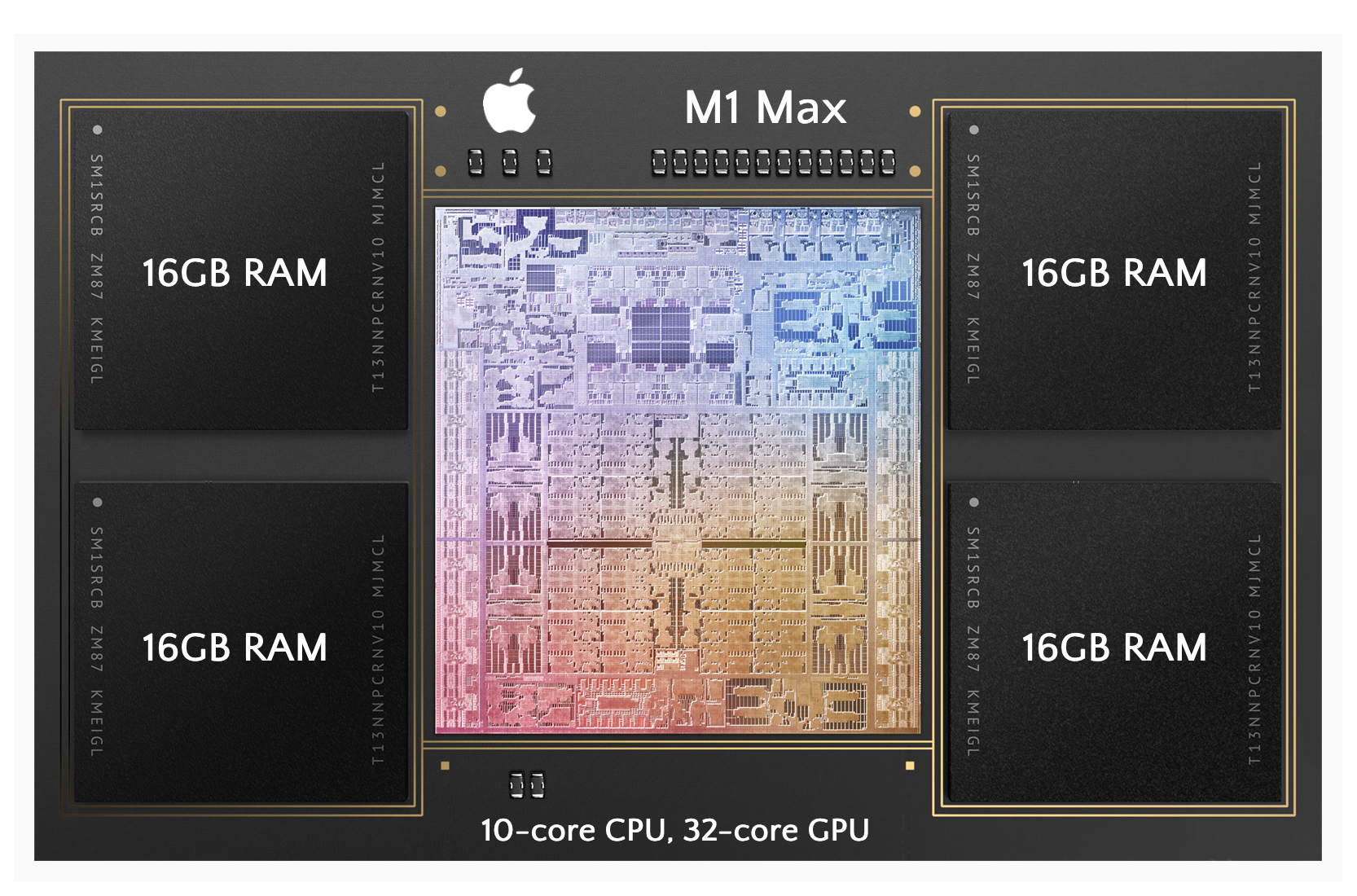

So I’ve placed an order for my first ARM laptop to finally replace my five year old 2017 Macbook Air (the last Intel processor) — (I’m going all-in on ARM) !
Machine Specs:
This is what happens! 😂 ¯\_(ツ)_/¯
So I was experimenting and if you can get signed certs from let’s-encrypt and dns records from cloud-flare, then you could store your public signed certificate as a set of split txt entries which anyone could verify with a set of trusted root certificates. You can then use the private key to sign an encryption key (stored as another txt record) along with the encrypted message (also another txt record).
This would allow you to sign, store, and send short messages (in a single direction) with confidentiality, integrity, and authenticity all through a plain text protocol (as long as the root certs exist)!

Verification Chain:
# ./dns_fun.sh fossjon.com d

Certificate:
    Data:
        Version: 3 (0x2)
        Serial Number:
            04:b3:64:ec:80:70:47:42:2a:8a:ef:b4:11:60:03:9d:23:78
    Signature Algorithm: sha256WithRSAEncryption
        Issuer: C=US, O=Let's Encrypt, CN=R3
        Validity
            Not Before: Oct  9 18:35:11 2021 GMT
            Not After : Jan  7 18:35:10 2022 GMT
        Subject: CN=*.fossjon.com
        Subject Public Key Info:
            Public Key Algorithm: rsaEncryption
                Public-Key: (2048 bit)
                Modulus:
                    00:c8:1c:f6:86:b7:b5:45:63:68:7b:e4:34:10:6e:
                    0c:51:da:73:5b:65:d4:f7:fd:c8:c7:2e:d8:8b:01:
                    2d:c5:67:a4:0e:7a:b6:57:bf:fe:2a:c9:52:4d:38:
                    51:56:a6:08:bb:5a:8f:85:32:88:c0:3c:9b:3e:ad:
                    f9:1a:aa:21:fb:b6:2f:d1:7c:bc:c1:6e:ae:d8:b4:
                    c9:87:a5:69:a4:c5:f9:1d:3a:1f:49:68:94:75:b9:
                    ab:f6:12:9f:56:4c:7f:26:f1:6e:85:9e:1e:66:be:
                    74:e0:01:91:6d:59:cb:0d:34:01:10:5c:b9:43:44:
                    52:07:6a:ca:3f:83:1e:41:6c:51:5a:a6:fa:20:8f:
                    33:40:76:90:ab:4d:04:6f:33:70:f0:09:c7:38:25:
                    26:15:70:d6:f9:f4:e6:b6:71:11:e0:7a:c6:04:86:
                    30:c9:56:f0:14:6e:9e:66:60:b3:7d:2b:42:a4:b9:
                    fb:6d:73:4f:26:2e:17:aa:a8:64:72:e2:f5:a8:b1:
                    17:8d:f4:db:a8:10:fc:70:ff:1b:cc:78:6f:04:84:
                    e0:fc:1d:15:72:de:41:bd:14:c5:26:72:3e:56:2a:
                    aa:1d:9f:1a:3c:17:40:91:21:7e:2a:b4:8a:c2:ab:
                    79:0f:dd:21:13:a1:2e:da:6a:a3:92:49:e7:f1:58:
                    36:bf
                Exponent: 65537 (0x10001)

Secret_key_123-77cf362ab2442e3fa3062d06adb571f0ea92647f0ba137300a272767d6ea0834

this is just a test of the emergency broadcast system, this is not the real thing!
#!/bin/bash

d="$1" ; z="$2" ; m="$3" ; k="$4"
echo

if [ "$z" == "e" ] ; then
  h=$(echo "$m" | openssl dgst -sha256 -r | awk '{ print $1 }' | tr -d '\t\r\n')
  t="${k}-${h}"

  e=$(echo "$m" | openssl enc -aes-256-cbc -e -k "$t" -S 00 | base64 -b 255)
  echo "$e" ; echo

  s=$(echo -n "$t" | openssl rsautl -sign -inkey privkey.pem | base64 -b 255)
  echo "$s" ; echo

  p=$(cat crt.pem | grep -iv '^---' | base64 -d | base64 -b 255)
  echo "$p" ; echo
fi

if [ "$z" == "d" ] ; then
  c=$(dig "z.pubcrt.$d" txt +short | tr -d ' "\n' | base64 -d | base64 -b 64)
  ( echo '-----BEGIN CERTIFICATE-----' ; echo "$c" ; echo '-----END CERTIFICATE-----' ) > /tmp/crt.pem

  t=$(openssl x509 -text -noout -in /tmp/crt.pem | grep -i 'exponent' -B 64)
  echo "$t" ; echo

  v=$(dig "z.pubkey.$d" txt +short | tr -d ' "\n' | base64 -d | openssl rsautl -verify -certin -inkey /tmp/crt.pem)
  echo "$v" ; echo

  o=$(dig "z.pubmsg.$d" txt +short | tr -d ' "\n' | base64 -d | openssl enc -aes-256-cbc -d -k "$v")
  echo "$o" ; echo
fi
So I decided to switch the nameserver records on my fossjon.com domain over to Cloudflare’s service for two different reasons. One is that they offer more advanced https reverse proxying tech along with a better dns management interface as well! I still have the domain registered with Google Domains as they also offer pretty good mx record email forwarding via gmail.

Cloudflare won’t let you directly rewrite the HTTP HOST header field anymore, however, they will let you setup a more advanced HTTP JavaScript worker process. This process can handle the incoming web proxy requests along with the outgoing responses and perform some modifications on them. This is an extremely powerful framework and it behaves more like a proper reverse proxy server would!
I created a GitHub repo to track the worker javascripts: github.com/stoops/cfworkers
Note: It seems like CF offers a better DNS API service, however, I couldn’t yet find a DNS backup button to help save all my records locally (hacky webarchive file but at least it’s sorted nicely).
javascript:(function(){
var t = document.getElementsByTagName("table")[0];
var s = t.getElementsByTagName("tr");
var m = {}, l = [], z = 1;
for (var i=0; i<s.length; ++i) {
  var d = s[i].getElementsByTagName("td");
  if (d.length > 4) {
    var k = d[2].innerText.trim();
    if (k.endsWith(".com")) { k = "@"; }
    if (!(k in m)) { m[k] = {"r":[]}; l.push(k); }
    var r = d[1].innerText.trim();
    if (!(r in m[k])) { m[k][r] = []; m[k]["r"].push(r); }
    m[k][r].push([d[3].innerText.trim(), d[4].innerText.trim()]);
  }
}
var b = "style='border: 1px solid black;padding: 4px;white-space: nowrap;'";
var o = "<table style='padding: 8px;'><tr><th "+b+">No.</th><th "+b+">Time</th><th "+b+">Record</th><th "+b+">Type</th><th "+b+">Value</th></tr>";
l.sort();
for (var i in l) {
  var k = l[i];
  m[k]["r"].sort();
  for (var j in m[k]["r"]) {
    var r = m[k]["r"][j];
    m[k][r].sort();
    for (var d in m[k][r]) {
      o += ("<tr><td "+b+">"+z+"</td><td "+b+">"+m[k][r][d][1]+"</td><td "+b+">"+k+"</td><td "+b+">"+r+"</td><td "+b+">"+m[k][r][d][0]+"</td></tr>"); ++z;
    }
  }
}
o += "</table>";
document.head.innerHTML = document.head.innerHTML.replace(/script/ig, "xscript");
document.body.innerHTML = o;
})();


